
PLEASE SHARE! 🙂


CDBurnerXP is a free CD, DVD, HD-DVD and Blu-Ray burning software. I first learned about CDBurnerXP when I was looking for free burning software for a work computer of mine that I wiped out and installed Windows Vista on. I didn’t want to waste the little budget money I had to buy Nero for simple data CD/DVD burning tasks and I dislike the basic Windows burning software.
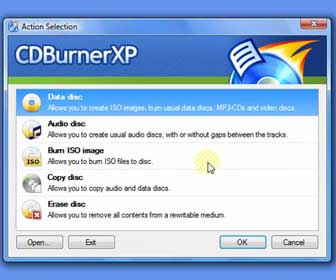
[adblockingdetector id=”1″]I downloaded and tried out several free disc burning programs. CDBurnerXP was the best free one out of the bunch and it was very easy to use. Besides having the ability to burn data discs CDBurnerXP can also create audio CDs from .mp3, .wav, .ogg, .flac and .wma song files. If you have ever downloaded ISO image files and did not know what to do with the file type you can easily burn them to a CD/DVD/Blu-Ray (after you burn the ISO file to a disc it will easily become readable). You can also create ISO image files with CDBurnerXP. BIN and NRG images are other file types that people sometimes download but can’t figure out how to open. CDBurnerXP will allow you to convert BIN and NRG files into ISOs. Then you can burn the ISO to a disc.
CDBurnerXP website: http://cdburnerxp.se
[adblockingdetector id=”5″]CDBurnerXP Operating System Compatibility
• Windows 2000 – 32 and 64-bit
• Windows XP – 32 and 64-bit
• Windows 2003 Server – 32 and 64-bit
• Windows Vista – 32 and 64-bit
• Windows 7 – 32 and 64-bit
• Windows 8 – 32 and 64-bit
In the following CDBurnerXP video tutorial I will take you step-by-step and you will easily learn the following…
1. How-To download and install CDBurnerXP
2. How-To burn a data disc using CDBurnerXP
3. How-To burn an audio CD using CDBurnerXP
PLEASE SHARE! 🙂
Tags: CDBurnerXP Basic Tutorial, Disc Burning Software, Windows Blu-ray disc program
normmc
Your site is so helpful to me . Your easy step by step instruction is just what I need to help me with my computer needs. Thanks so much, and keep up the good work.